Solitaire Game:Classic Card
ECKERT GAMINGPuzzle
4.6727.00 Reviews
- Version
- 2.7.0
- Installs
- 500.00K
- Age Rating
- Teen
Screenshots
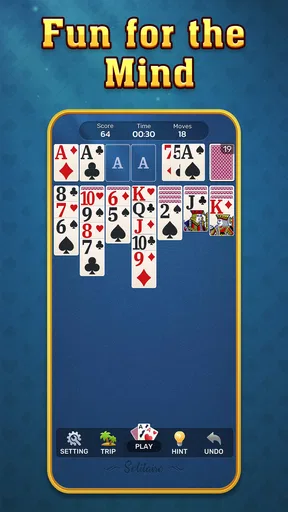
Our Review of Solitaire Game:Classic Card
 Analysis by Appyee
I approached Solitaire Game:Classic Card as a quiet, familiar card game rather than expecting a large adventure or a complicated collection of modes. That turned out to be the right mindset. Developed by ECKERT GAMING, this free puzzle game focuses on the simple appeal of arranging cards, spotting useful moves, and trying to complete a deal without rushing into a mistake. Its store summary promises a fresh take on card games, but the real attraction is more practical: it gives solitaire fans an easy way to fill a short break.
My overall impression is positive, with an important qualification. This is best for people who already enjoy the rhythm of solitaire and want a straightforward mobile option. It is less convincing for anyone looking for a deep progression system, a competitive card experience, or a game that explains every part of its design in detail. The Teen content rating is worth noticing, especially for families choosing games for younger players.
How the game feels in ordinary use
The basic appeal is easy to understand. A solitaire puzzle asks me to balance immediate moves against the possibility of opening a better route later. I may have a legal move available, but taking it immediately is not always wise. That small tension is what keeps the game from becoming pure repetition. Even a short session can involve planning, reconsidering, and accepting that a promising layout may not work out.
That makes it a natural companion for everyday situations where I have a few spare minutes: waiting for an appointment, taking a break from work, or winding down before bed. I do not need to remember a story, coordinate with another player, or prepare a long session. I can start with the intention of playing briefly and stop after a single attempt. For me, that low commitment is one of the strongest reasons to keep a solitaire game installed.
The puzzle category also explains what this game does well. It is not trying to overwhelm the player with action or constant notifications. The satisfaction comes from recognizing patterns and using the available cards carefully. If I enjoy traditional card-table solitaire, the familiar structure is likely to feel comfortable. If I need novelty every few minutes, the repeated format may feel narrow.
The current release is version 2.7.0, and the game runs on Android 8.0 or later. That makes it suitable for many older devices as well as newer phones, although the actual comfort of play will still depend on screen size and general device performance. On a compact display, card positions can feel more crowded, especially when I am trying to inspect several possible moves before committing to one.
What I pay for, and what I do not
The game is free to download, which lowers the barrier to trying it. That matters for solitaire because the core idea is familiar enough that I want to test the handling and presentation before deciding whether it deserves space on my phone. I can begin without making a purchase decision at the door.
For fairness, I would separate the confirmed price from assumptions about spending. The game is listed as free, but I would not treat that alone as proof that every part of the experience is free of optional purchases or other monetization. A careful player should inspect the in-game screens and device store purchase controls before spending. I prefer that approach to guessing about offers, subscriptions, or paid advantages that are not clearly established.
This also affects who should install it. Someone who wants a no-cost solitaire pastime can try it with relatively little commitment. Someone who specifically requires a fully transparent purchase model should check the purchase information shown on their own device before investing time or money. That is not a criticism of the card mechanics; it is simply a sensible distinction between a free download and a complete spending policy.
Progress without turning every move into pressure
Solitaire can create pressure even without opponents. A nearly finished layout makes a poor decision feel expensive, while an early mistake may only become obvious several moves later. I like that kind of gentle pressure when it stays under my control. It encourages me to pause and look for a better sequence instead of tapping automatically.
In practice, I use a simple routine. I first scan for moves that reveal a hidden card or create more room. I then check whether moving a card to an available foundation is genuinely useful or merely removes flexibility. Only after that do I make less important rearrangements. This order helps me avoid the common trap of spending every open option too quickly.
A second useful habit is to treat the undo function, if available in the particular play session, as a learning tool rather than a way to erase all consequences. I can review the point where the layout became restricted and understand which choice caused the problem. Because I do not want to claim a feature without seeing it clearly documented for every version, I would check the controls on the device before relying on undo as part of my strategy.
The same caution applies to hints, automatic moves, and any system that may reduce decision-making. These tools can make a game friendlier for beginners, but they can also remove the satisfaction of solving a layout independently. If the interface offers assistance, I would use it selectively: perhaps once to understand an unfamiliar situation, then continue unaided. That gives the game a better balance between accessibility and personal achievement.
Players who need a strong sense of long-term progression may find the experience less rewarding than a larger puzzle title. Solitaire naturally repeats its central activity, so the motivation comes from improving decisions and completing deals rather than from a story campaign. I would skip this game if my main goal were unlockable worlds, a detailed achievement journey, or frequent changes in objectives.
Fairness when there is no traditional opponent
Competitive fairness looks different in a solitaire game. I am usually playing against the layout, my own choices, and sometimes the temptation to make a quick move. There is no reason to expect the same kind of matchmaking or player-versus-player balance found in a multiplayer card game. The important questions are whether the rules remain understandable, whether the interface gives me a fair chance to see the available options, and whether optional spending changes the challenge.
I find the cleanest way to judge fairness is to watch my own decision-making. If I lose because I overlooked a legal move or opened the wrong column too soon, that feels like a useful failure. If I cannot tell why a move was unavailable, or if the layout becomes difficult to read, frustration comes from presentation rather than puzzle difficulty. On a phone, clear card spacing and predictable touch response matter almost as much as the rules.
Players who compare this with a classic offline solitaire application should keep expectations realistic. A traditional alternative may feel more trustworthy simply because it is extremely stripped down: start a deal, move cards, finish or restart. A newer mobile presentation can be more convenient, but every extra screen or optional aid has the potential to interrupt the quiet flow. My preference depends on whether I value a polished phone experience over the absolute minimum of interface.
Against multiplayer card games, this title has one obvious advantage: I do not need another person to be available, and I am not competing with someone using a different device, connection, or spending level. That makes it a better choice for private relaxation. On the other hand, it cannot provide the social tension, bluffing, or direct challenge that makes competitive card games exciting.
There is also a fairness trade-off in replaying a difficult layout. If I restart repeatedly until the opening happens to be favorable, I am changing the challenge from solving a deal to searching for a convenient start. That is perfectly acceptable for casual play, but it is useful to recognize the difference. For a more honest personal test, I would finish a session after a reasonable number of attempts and judge whether my choices improved.
Small habits that make the game more enjoyable
One non-obvious advantage of solitaire on a phone is that I can use it as a reset between demanding tasks, but only if I set a boundary. A single deal works well as a break. Replaying the same position again and again can become a form of procrastination, particularly when the game makes failure feel almost solvable. I recommend deciding in advance whether the goal is one deal, a short timed pause, or practice with a specific type of decision.
I also avoid playing with the phone held at an awkward angle. Solitaire looks simple, yet a small mis-tap can move the wrong card or make me think a legal move failed. Holding the device steadily with one hand while tapping with the other gives me more control than trying to play while walking or carrying something. This is especially relevant for older phones with smaller screens.
Another useful approach is to review the board in layers. I first identify cards that are blocked, then consider moves that expose them, and only afterward think about building long sequences. This prevents a visually attractive move from distracting me from the card that actually controls the position. It is a modest change, but it makes the puzzle feel more deliberate and reduces random tapping.
For beginners, I would not start by chasing perfect results. I would focus on learning which moves preserve flexibility. A move that opens a new card or creates an empty space may be more valuable than one that immediately sends a card toward completion. Once that habit becomes natural, the familiar rules become more interesting because each choice has a visible consequence.
What I would check before making it a long-term game
The game has attracted a 4.6 average from roughly 3.7 thousand ratings, and it has passed half a million installs. Those figures suggest that it has found a substantial audience, but they do not replace personal testing. Solitaire preferences are unusually individual: one player may love a minimal layout while another may reject it because the cards feel too small or the pace too slow.
I would spend the first session checking four practical details. Can I read every card comfortably? Do taps register reliably? Is it easy to restart or leave a deal? Do any prompts interrupt the part of the game I actually came to play? These questions tell me more about daily suitability than a rating alone.
I would also pay attention to how the game handles mistakes. A good solitaire interface should make it clear what happened after a tap, without making me feel that I have lost control of the board. If I frequently need to guess whether a card moved, the experience becomes tiring. If the layout remains readable and the controls feel predictable, the simplicity becomes an advantage.
The release date is February 28, 2026, so anyone choosing an app for a particular device should still check compatibility directly before installing. The stated minimum is Android 8.0, but operating-system support is only one part of the experience. Available storage, display dimensions, and the condition of the phone can all affect whether a card game feels comfortable.
The Teen rating is another practical consideration. I would not assume that a card game is automatically suitable for every child simply because the rules are familiar. Parents should review the rating and the visible store and in-game context themselves, especially if the phone is shared. That is a quick step and avoids treating the word “solitaire” as a complete description of the audience.
Who should choose it, and who should look elsewhere
I would recommend this game to someone who wants a free, familiar puzzle for short solo sessions and does not need a large amount of narrative content. It fits people who enjoy thinking several moves ahead, replaying a difficult deal, and using a phone as a convenient card table. It may also suit a player who is moving from physical solitaire to mobile play and wants an accessible starting point.
I would be more cautious about recommending it to someone who wants guaranteed offline behavior, extensive customization, or a clearly documented collection of advanced systems. Those expectations should be checked in the actual app rather than assumed from the name. If absolute simplicity is the priority, a very basic classic solitaire alternative may be a better fit. If social competition matters most, a multiplayer card game will offer more energy and interaction.
I would also skip it for a child if the Teen rating does not match the family’s rules, regardless of how harmless the card format may seem. Likewise, players who dislike repeated layouts, restart-based play, or quiet solo challenges will probably tire of it quickly. The game’s strength is focus, and that same focus becomes a limitation when I want variety.
My trust verdict after weighing the trade-offs
The fairest way to view Solitaire Game:Classic Card is as a convenient puzzle tool, not a promise of endless depth. Its free entry, familiar card structure, and broad device compatibility make it easy to try. Its audience size and strong average rating are encouraging signs, while the developer, ECKERT GAMING, gives the release a clear identity rather than leaving it as an anonymous card clone.
Still, I would make my decision based on the first few minutes of actual use. I would confirm that the cards are comfortable to read, that the controls behave as expected, and that any spending prompts are understandable before treating it as a permanent part of my routine. I would not spend money merely to improve a frustrating session; if the basic handling does not feel right, another solitaire option is the better answer.
For me, the game works best when I use it intentionally: one quiet deal during a break, a careful look at the board, and no pressure to turn a small puzzle into a daily obligation. It is a reasonable choice for casual solitaire fans who value convenience and a low-cost entry point. It is not the right choice for players seeking rich progression, direct competition, or complete certainty about every purchase-related detail before opening the app.
That leaves me with a measured recommendation. Try it if you want a straightforward mobile solitaire experience and your device meets the Android requirement. Keep your expectations centered on card puzzles, inspect the in-game purchase context yourself, and judge the interface by how naturally it fits your hands and your routine. If those basics work for you, this free release can provide a pleasantly focused way to spend a few spare minutes.
Verdict
Strengths of Solitaire Game:Classic Card
- Simple rules make it easy for beginners to start playing.
- Classic card layouts provide a familiar, relaxing experience.
- Short rounds are convenient for quick breaks or casual play.
- Runs smoothly on most modern Android and iOS devices.
- Useful for improving focus, patience, and strategic thinking.
Limitations of Solitaire Game:Classic Card
- Gameplay may feel repetitive after extended sessions.
- Some features may require watching advertisements to unlock.
- Limited social options reduce interaction with other players.
- Random card deals can occasionally create unwinnable hands.
- Visual customization may be less extensive than in rival apps.
Other Releases by ECKERT GAMING
View All
BlockDown:Puzzle Games
Casual4.0

Solitaire: Relaxing Card Game
Casual4.5
Similar Picks in This Category
View All
Block Blast!
HungryStudio4.8

Braindom: Brain Games Test
Lahana Game Studio4.6

AMAZE!
CrazyLabs LTD4.6

Sudoku - Classic Sudoku Puzzle
Oakever Games4.7

Art Puzzle - Puzzle Games
Easybrain4.8

Amaze GO!
Oakever Games4.9
Frequently Asked Questions
What is Solitaire Game: Classic Card?
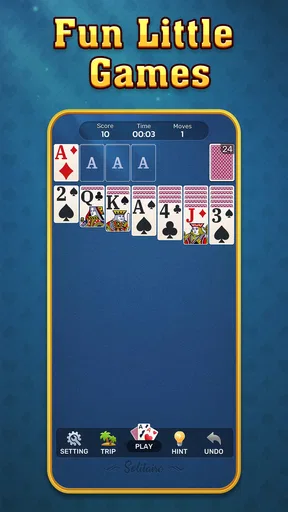
Solitaire Game: Classic Card is a digital version of the familiar Klondike solitaire card game, designed for quick and relaxing solo sessions. It generally includes standard draw options, simple tap or drag controls, and a traditional card-table layout. The game is suitable for casual players who want to enjoy solitaire on a phone or tablet without needing another player.
How do you play Solitaire Game: Classic Card?
The objective is to move all cards into the four foundation piles, arranged by suit from Ace through King. Cards on the tableau are placed in descending order with alternating colors, while face-down cards can be revealed as you uncover them. You can usually move cards by tapping or dragging, and the game may provide hints or undo options when you are unsure of your next move.
Can Solitaire Game: Classic Card be played offline?
Solitaire Game: Classic Card is commonly designed for offline play, allowing users to start a game without a continuous internet connection. This makes it convenient for travel, commuting, or short breaks when mobile data or Wi-Fi is unavailable. However, advertisements, updates, statistics synchronization, or certain optional features may require an internet connection depending on the version installed.
Is Solitaire Game: Classic Card free to download?
The game is typically available as a free download, although the exact offer can vary between Android and iOS. Free versions may include advertising, optional purchases, or premium features such as ad removal, extra card designs, and additional customization. Before installing, check the store listing for in-app purchase details, supported devices, permissions, and the developer’s current pricing information.
Does Solitaire Game: Classic Card include hints, undo, or customization options?
Many versions of Solitaire Game: Classic Card include helpful features such as unlimited or limited undo moves, hints, automatic card placement, daily challenges, scoring, and statistics. Customization may include different card faces, backgrounds, and layouts. These options can differ by release, so players who prefer a completely traditional experience should review the feature list and screenshots before downloading.
Play our best games!


